

Here's a stat that should concern anyone in education: teachers work an average of 54 hours per week, but only 46% of that time is spent actually teaching.
The rest? Administrative tasks, grading, paperwork, emails, attendance tracking, and the endless cycle of data entry that nobody signed up for.
According to a 2025 Learnosity survey, teachers spend 9.9 hours every week just on grading, more than a full workday. A third of US teachers have considered leaving the profession entirely because of this workload. And when you factor in the $25,000 cost to replace a single teacher, the burnout problem becomes a business problem too.
Meanwhile, a Flowtrics study found that educators and administrators spend up to 40% of their time on repetitive tasks that automation could handle. That's not a small inefficiency. That's nearly half the workweek lost to busywork.
The good news? Education workflow automation is finally catching up. Schools and universities that implement it are seeing real results: thousands of hours saved, faster response times, and staff who can actually focus on students instead of spreadsheets.
This guide breaks down what education workflow automation actually is, where it makes the biggest impact, and how to get started without overcomplicating things.
What Is Education Workflow Automation?
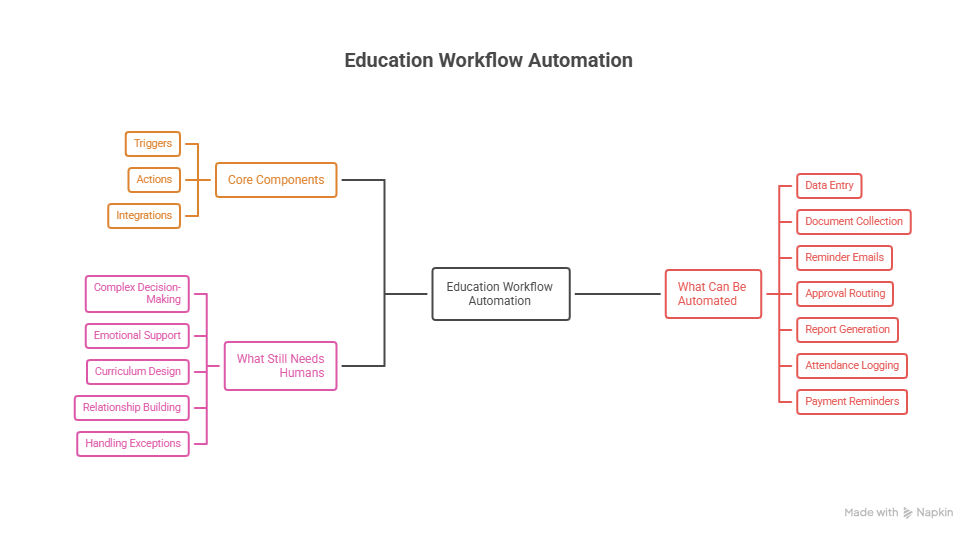
Education workflow automation uses technology to handle repetitive administrative tasks without constant human involvement. Instead of manually processing forms, sending reminder emails, or entering data into multiple systems, automated workflows do it for you.
Think of it like setting up a chain reaction. A student submits an application (that's the trigger). The system automatically verifies documents, routes the application to the right department, sends a confirmation email, and updates your database (those are the actions). No one had to copy-paste anything or remember to follow up.
The Core Components are Simple
- Triggers:- The event that starts the workflow (from submission, deadline reached, status change)
- Actions:- What happens automatically (send email, update records, create task, notify staff)
- Integrations:- Connections between your existing systems (LMS, SIS, Email, Payment Platforms)
What Can Be Automated
- Data entry and transfer between systems.
- Document collection and verification.
- Reminder emails and notifications.
- Approval routing and tracking.
- Report generation.
- Attendance logging.
- Payment reminders.
What Still Needs Humans
- Complex decision-making.
- Emotional support and counseling.
- Creative curriculum design.
- Relationship building with students.
- Handling exceptions and edge cases.
The goal isn't to remove people from education. It's to remove the tedious tasks that drain their time and energy.
Thinking About Automating Your School's Admin Work?
We help schools and universities figure out which workflows to automate first their budget.

7 Areas Where Education Automation Makes the Biggest Impact
Not all automation is created equal. Some workflows save minutes. Others save thousands of hours. Here's where schools and universities are seeing the biggest returns.
1. Student Admissions and Enrollment
Admissions is a paperwork nightmare. Applications pour in, each with transcripts, recommendation letters, test scores, and personal statements.
Staff manually check documents, enter data into systems, and chase missing materials. It's slow, error-prone, and exhausting during peak seasons.
What Automation Looks Like
Students complete applications through digital forms. The system uses OCR (optical character recognition) to extract data from uploaded documents. It automatically checks for missing materials and sends reminders.
Complete applications route to reviewers based on program or criteria. Status updates go out without anyone clicking "send."
The Results are Significant
Universities using platforms like Process Maker have reduced application processing time by up to 40%. Staff spend less time on data entry and more time on actual evaluation. Students get faster responses, which improves enrollment rates.
Florida's Broward County Public Schools implemented automated systems for scheduling, grading multiple-choice assessments, and personalized parent communication, streamlining operations across one of the largest school districts in the country.
2. Grading and Assessment
Teachers spend 9.9 hours per week on grading, according to Learnosity's 2025 research. That's more than a full workday every single week, just marking papers. And 95% of teachers take grading home with them.
No wonder 62% identify grading as one of the worst parts of being a teacher.
What Automation Handles
AI-powered tools auto-grade objective assessments, multiple choice, fill-in-the-blank, matching, and even some short-answer questions. They score instantly, record results, and flag patterns (like an entire class struggling with the same concept).
For subjective work like essays, automation helps with initial feedback on grammar, structure, and rubric alignment. Teachers review and add personalized comments instead of starting from scratch.
The Time Savings
An EdWeek Research Center study found that teachers spend about five hours per week on grading and feedback. Cutting that by even gives teachers back half a workday for instruction, planning, or their own lives.
3. Attendance Tracking and Reporting
Manual roll calls waste instructional time. Paper-based systems create compliance headaches. And when attendance data lives in one system while grades live in another, generating reports becomes a manual puzzle.
Automated Attendance Works
Digital check-ins (QR Codes, biometrics, or app-based logging) record attendance automatically. The system flags absences and sends notifications to parents immediately, not a day later. Patterns trigger alerts. If a student misses three classes in a row, the counselor gets notified.
Compliance reports generate themselves. End-of-term attendance summaries that used to take hours now take seconds.
Why does it matter?
Attendance correlates directly with academic success. The faster you identify attendance issues, the faster you intervene. Automation makes that identification instant instead of waiting for a teacher to notice and remember to report it.
4. Student Communication and Support
Students have questions at all hours. When's the assignment due? How do I register for next semester? What's the status of my financial aid?
Traditional support means staff answering the same questions hundreds of times, or students waiting days for responses.
AI Chatbots Change this Equation
Georgia State University deployed a chatbot to handle common enrollment and financial aid questions. The result? A significant reduction in "summer melt" students who intend to enroll but never show up because they get stuck on logistics.
UCLA uses chatbots to answer frequently asked admissions questions, freeing staff for complex cases that actually need human attention.
Beyond Chatbots, Automation Handles
- Deadline reminders are sent automatically based on student status.
- Payment due notifications are sent before accounts become delinquent.
- Event invitations targeted to program years or interests.
- At-risk student alerts when engagement patterns drop.
The average response time for student inquiries at many institutions is 42 hours. Automation can cut that to seconds for routine questions.
5. Course Scheduling and Resource Management
Creating class schedules involves dozens of variables: room availability, faculty preferences, student course loads, time conflicts, and equipment needs. Do it manually, and you're solving a puzzle with thousands of pieces.
Automation Handles the Complexity
Scheduling software analyzes constraints and generates optimized timetables. When a room becomes unavailable, the system finds alternatives and notifies affected parties. Students get personalized schedules based on their degree requirements and preferences.
Resource booking labs, equipment, and study rooms happens through automated systems that prevent double-booking and send confirmations.
The Efficiency Gain
What takes administrators days of manual juggling can be reduced to hours. More importantly, automated scheduling reduces conflicts and the cascade of problems that follow when someone accidentally double-books a lecture hall.
6. Financial Operations
Tuition collection, fee reminders, financial aid processing, and expense approvals. Finance departments are drowning in repetitive tasks that follow predictable patterns.
Automation Streamlines The Money Flow
- Payment reminders go out automatically at set intervals before due dates.
- Late payment notifications escalate through a defined sequence.
- Financial aid document requests trigger when applications are incomplete.
- Expense reports route to appropriate approvers based on amount and category.
- Budget reports compile automatically from transaction data.
Why This Matters for Education Specifically
Schools operate on tight budgets with seasonal cash flow challenges. Faster tuition collection improves financial stability. Fewer manual errors mean fewer disputes. And finance staff can focus on strategy instead of chasing payments.
7. Faculty and Staff Administration
HR processes in education face the same challenges as any industry, but with added complexity around academic calendars, tenure tracks, and compliance requirements.
Common Automation Targets
- Leave request: Staff submit through a form, and managers approve with one click, calendars update automatically, and coverage notifications go out.
- Onboarding: New hire paperwork, system access requests, training assignments, and equipment allocation flow through a defined sequence.
- Professional development: Course completions log automatically, certification renewals trigger reminders, and compliance reports are generated for audits.
The College of Paramedics of Nova Scotia automated their registration process after struggling with misaligned data collection and slow renewals. A secure self-service portal and intelligent forms streamlined the entire process.
Abingdon & Witney College implemented workflow automation to address paper-based processes spread across multiple campuses. They eliminated delays, lost paperwork, and fragmented workflows by digitizing high-volume processes quickly and affordably.
Not Sure Where to Start with Education Automation?
We'll walk you through the high-impact workflows, the right tools for your setup, and how to avoid the common mistakes.
Why 2026 Is the Tipping Point for Education Automation
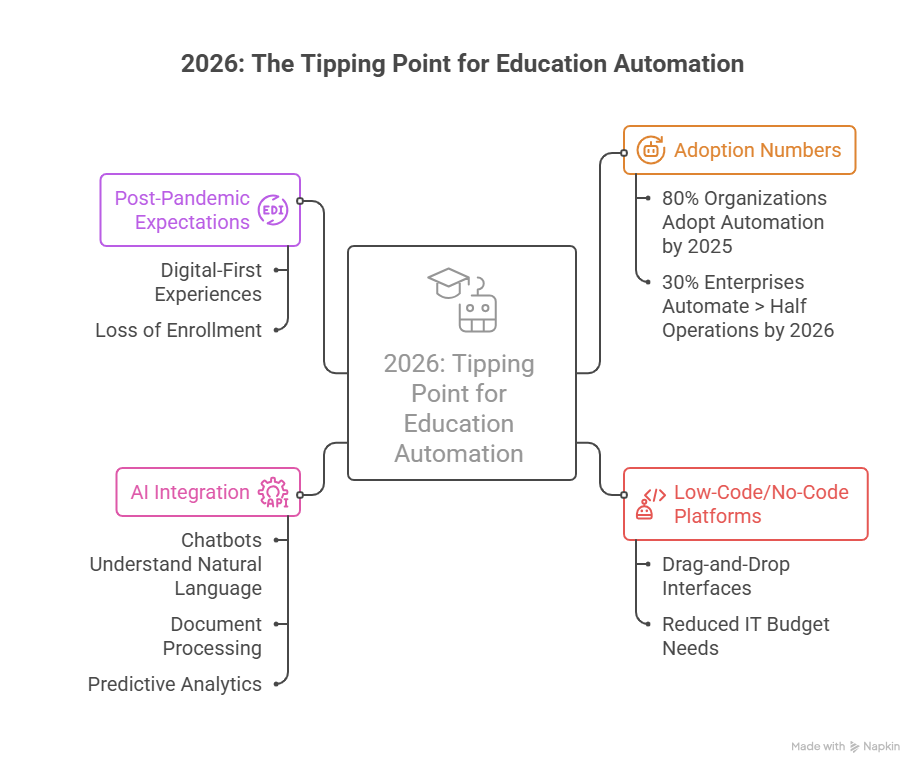
Workflow automation isn't new. But several trends are converging to make 2026 the year it becomes mainstream in education.
The adoption numbers are hard to ignore
According to Kissflow, 80% of organizations will adopt intelligent automation by 2025. Gartner predicts that by 2026, 30% of enterprises will have automated more than half of their operations, up from less than 10% in 2023.
Low-code and no-code platforms changed the game
You don't need a development team to build workflows anymore. Platforms with drag-and-drop interfaces let administrative staff create automations themselves. Gartner predicted that 70% of new applications would use low-code or no-code technologies by 2025.
This matters enormously for education, where IT budgets are tight and technical staff are stretched thin.
AI Made Automation Smarter
Early automation was purely rule-based: if X happens, do Y. Now, AI integration means workflows can handle more nuance. Chatbots understand natural language questions.
Document processing extracts data from unstructured formats. Predictive analytics flags at-risk students before they fail.
Post-Pandemic Expectations Accelerated Everything
Students and parents now expect digital-first experiences. They've used seamless online services everywhere else, banking, shopping, and healthcare. Paper forms and week-long response times feel antiquated.
Schools that don't modernize will lose enrollment to those that do.
Real Results: What Schools Are Actually Seeing
Theory is nice. Results are better. Here's what institutions report after implementing education workflow automation:
Georgia State University: Their AI chatbot handled enrollment and financial aid questions, contributing to significant reductions in summer melt and helping eliminate achievement gaps across demographic groups.
ProcessMaker implementations: Universities using their platform reduced application processing time by up to 40%. CUNY School of Law modernized communication between staff and students, creating faster response times and better cross-campus experiences.
Industry benchmarks: Organizations save an average of $46,000 annually just by automating repetitive tasks. Educational institutions often see higher returns because administrative burden concentrates during peak periods like enrollment and grading seasons.
The pattern is consistent: automation delivers measurable time savings, which translates to cost savings and improved experiences for staff and students alike.
Ready to Build Automated Workflows for Your Institution?
Let's turn your manual processes into systems that actually save your staff time.
Conclusion
The administrative burden on educators isn't going away. Student expectations are rising. Staff are burning out. Budgets remain tight.
Workflow automation won't solve everything. But it directly addresses the 40% of educators' time spent on tasks that don't require human judgment, such as data entry, reminder emails, form processing, and report generation.
Schools that automate these workflows free their staff to do what actually matters: teaching, mentoring, supporting students, and building the relationships that make education work.
The technology is ready. The platforms are accessible. The question is whether your institution will spend another year drowning in administrative busywork or finally automate what should have been automated years ago.
Ready to Build Automated Workflows for Your Institution?
We've been building EdTech solutions since 2015. Let's turn your manual processes into systems that actually save your staff time.
FAQs
What is education workflow automation?
Education workflow automation uses technology to handle repetitive administrative tasks in schools and universities without manual effort. This includes processes like student enrollment, document collection, attendance tracking, grading, communication, and approvals.
How much time can schools save with workflow automation?
The University of Melbourne saved 10,000 labor hours annually. Teachers spend nearly 10 hours weekly on grading alone, automation can cut that substantially. Industry averages show organizations save $46,000 per year by automating repetitive tasks.
What processes should schools automate first?
Start with high-volume, repetitive processes that follow predictable patterns. Common starting points include admissions inquiry responses, leave request approvals, document collection for enrollment, payment reminders, and routine student communications.
Do we need technical staff to implement workflow automation?
Not necessarily. Modern low-code and no-code platforms let non-technical staff build workflows using visual, drag-and-drop interfaces. While IT involvement helps with integrations and security, administrative staff can often create and manage basic automations themselves.
Is automation secure enough for student data?
Reputable platforms include encryption, role-based access controls, and compliance features. However, schools must verify that any automation tool meets requirements like FERPA (in the US) or GDPR (in Europe). Security should be a primary evaluation criterion, not an afterthought.
