

According to a special report on cyberwelfare in the C-Suite by Cybercrime Magazine, global cybercrime costs will increase by 15% annually over the next half a decade and cross US$10.5 trillion annually by the end of 2025.
This figure is up from US$3 trillion in 2025. If you are an app developer, this is not merely a stat but a red signal. A single vulnerable spot in your app's back-end can result in disastrous data breaches, regulatory fines, or irreversible user trust.
This is why the powerful combination of FlutterFlow and Firebase integration is invaluable for modern app development. While FlutterFlow accelerates no-code frontend development, Firebase's secure and scalable backend services provide enterprise-grade security by managing everything from real-time data synchronization to bulletproof user authentication.
Firebase integration with FlutterFlow creates a comprehensive no-code backend solution that handles complex database integration challenges seamlessly. FlutterFlow Firebase combination enables developers to build secure mobile applications without extensive backend development expertise.
However, Firebase integration alone isn't sufficient for robust app security. You also need strategic Firebase security rules to protect sensitive data from potential intruders, optimized Cloud Functions to automate critical workflows, and real-time Firestore databases that scale seamlessly under heavy user loads.
Cloud Firestore provides real-time database capabilities that sync instantly across devices, while Firebase Authentication ensures secure user management in your FlutterFlow applications. This backend integration approach eliminates traditional server management complexities.
In this comprehensive guide, we'll explore what makes Firebase an ideal backend partner for FlutterFlow development. We'll cover step-by-step FlutterFlow Firebase integration processes with zero DevOps complications required. Finally, we'll discuss Third Rock Techkno's battle-tested Firebase integration strategies that help avoid costly development oversights.
Firebase services, including Firestore integration, Firebase Authentication, Firebase Hosting, and Firebase Analytics, work seamlessly with FlutterFlow's visual development platform. This no-code backend approach democratizes enterprise-grade app development.
We're nearly halfway through 2025, making it crucial to understand that your app's backend integration isn't merely infrastructure it's your brand's reputation foundation. FlutterFlow Firebase integration provides the robust, unwavering backend services modern applications demand.
Serverless backend architecture through Firebase integration ensures your FlutterFlow applications can scale from hundreds to millions of users without architectural changes. This database integration flexibility makes Firebase the preferred backend solution for no-code app development.
Quick answer: FlutterFlow integrates natively with Firebase for authentication, Firestore, storage, and cloud functions, so you can build a full backend without leaving the visual builder. It's the fastest way to ship a scalable FlutterFlow app, though advanced logic still benefits from custom functions.
Why is Firebase a Great Backend Solution for FlutterFlow Apps?
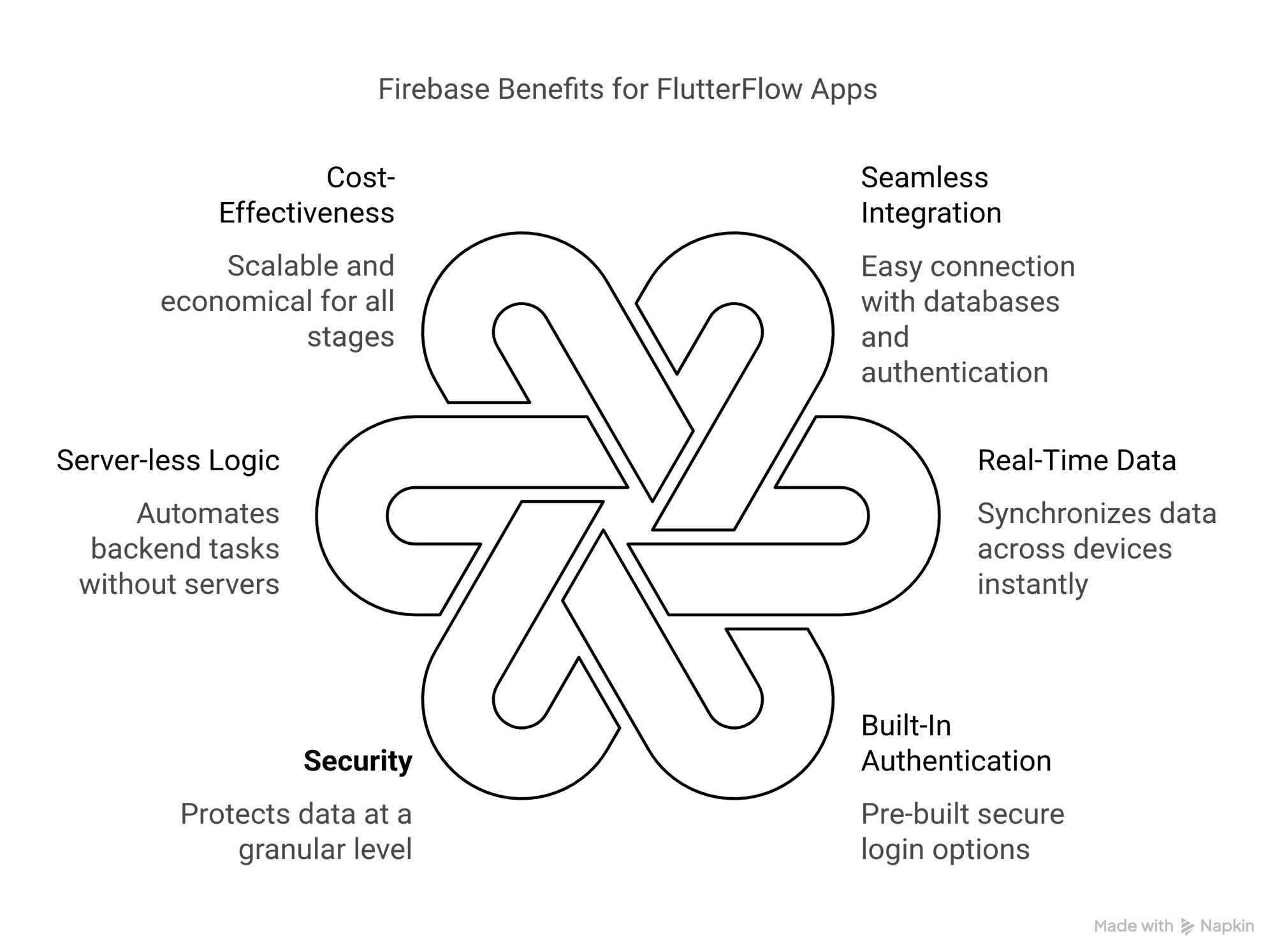
Firebase provides your FlutterFlow applications with a competitive edge through real-time data synchronization, built-in security, and auto-scaling capabilities. This backend integration allows you to focus on developing app features rather than managing servers. It's the fastest way to launch a production-ready FlutterFlow backend without DevOps overhead.
FlutterFlow Firebase integration represents the pinnacle of no-code backend development, combining visual app development with enterprise-grade backend services. This Firebase integration approach eliminates traditional backend development complexity while maintaining professional application standards.
1. Immaculate FlutterFlow Firebase Integration
You don't need to stress about managing API integrations or complex server setups. Firebase plugs directly into FlutterFlow, enabling instant connections with databases, Cloud Functions, and authentication systems in minutes rather than days.
FlutterFlow Firebase connectivity streamlines backend integration through visual configuration, making database integration accessible to developers at all skill levels. This no-code backend approach accelerates app development significantly.
2. Real-Time Data Synchronization Made Effortless
Thanks to Firestore integration in FlutterFlow, your mobile applications synchronize real-time data across devices instantaneously. Whether building live chat features, collaborative tools, or dynamic feeds, seamless updates happen without complex backend logic.
Cloud Firestore provides robust real-time database capabilities that sync automatically across all connected devices. This Firebase integration ensures your FlutterFlow applications deliver responsive user experiences through real-time data updates.
3. Built-In Authentication Without Development Headaches
Why struggle building user authentication systems when Firebase Authentication supports Google, Apple, email/password, and social logins securely? These authentication services are pre-built, tested, and ready for FlutterFlow deployment.
Firebase Authentication integration with FlutterFlow requires minimal configuration while providing enterprise-grade security. This backend integration handles user management, password resets, and account verification automatically.
4. Enterprise-Grade Security You Can Trust
Firebase security rules enable granular data protection, safeguarding your FlutterFlow applications from accidental leaks or unauthorized access. These database security features create robust, compliant backend solutions without complex configuration.
Firestore security rules work seamlessly with FlutterFlow's user interface, providing real-time database protection that scales with your application. This Firebase integration ensures data security across all backend services.
5. Serverless Logic with Cloud Functions Integration
Cloud Functions execute backend code automatically for notifications, data cleanup, or payment processing without server management. This serverless backend approach eliminates infrastructure headaches while providing powerful backend automation.
FlutterFlow integrates with Firebase Cloud Functions seamlessly, enabling complex backend logic through visual development. This backend integration provides enterprise capabilities without traditional server complexity.
6. Cost-Effective for Startups and Enterprise Scale
Firebase's pay-as-you-go pricing keeps costs minimal for early-stage FlutterFlow applications while ensuring scalability for growth. This backend solution suits lean budgets and high-growth projects equally well.
Firebase integration with FlutterFlow provides predictable backend costs that scale with usage, making database integration and backend services accessible for any budget size.
7. Comprehensive Analytics and Performance Monitoring
Firebase Analytics integration provides detailed insights into FlutterFlow application performance, user behavior, and engagement metrics. This backend integration enables data-driven decisions for app optimization.
Firebase Performance Monitoring tracks application performance in real-time, identifying bottlenecks and optimization opportunities in your FlutterFlow applications. This backend monitoring ensures optimal user experiences.
8. Simplified File Storage and Content Management
Firebase Storage provides secure, scalable file storage for FlutterFlow applications, handling images, videos, and documents seamlessly. This backend integration eliminates complex file management systems.
Cloud Storage integration with FlutterFlow enables drag-and-drop file handling through visual development, making content management accessible without backend development expertise.
The FlutterFlow Firebase integration delivers faster launches, fewer bugs, and reliable backend functionality. Whether prototyping or scaling enterprise applications, this no-code backend approach represents an intelligent app development strategy.
Firebase services combined with FlutterFlow's visual development create the most comprehensive no-code backend solution available, enabling rapid mobile application development without sacrificing professional capabilities.
Salient Features of Firebase for FlutterFlow Development
If you consider Firebase for FlutterFlow merely a backend solution, you're underestimating its potential. Firebase is a comprehensive platform that provides essential momentum to FlutterFlow applications. Its pertinent features, from real-time data synchronization to serverless automation, make Firebase integration indispensable for modern app development.
FlutterFlow Firebase integration leverages these powerful Firebase services to create robust no-code backend solutions that scale effortlessly with your application needs.
1. Real-time Database Providing Instant Updates With Zero Hassle
Real-time database synchronization across devices happens in seconds through Cloud Firestore integration, making it ideal for live feeds, collaborative tools, or chat applications without manual refreshes or complex backend code.
Firestore integration with FlutterFlow enables real-time data updates that keep all connected devices synchronized automatically. This database integration ensures seamless user experiences across mobile applications.
2. Firebase Authentication That Secures User Access in Minutes
Thanks to pre-built user authentication from Google, email, Apple, and social providers, Firebase Authentication integrates seamlessly with FlutterFlow applications. This authentication integration saves hours of development time while ensuring your FlutterFlow backend remains completely secure.
Firebase Authentication provides enterprise-grade security for FlutterFlow Firebase applications, handling user registration, login, password resets, and account verification automatically through visual development configuration.
3. Cloud Functions That Provide Backend Logic Without Server Management
Cloud Functions automate app functionality like payment processing, notifications, and data cleanup without requiring server management. Simply write the function, and Firebase integration handles execution automatically for your FlutterFlow applications.
Serverless backend logic through Cloud Functions eliminates infrastructure complexity while providing powerful backend automation capabilities. This Firebase integration enables complex backend processes without traditional server overhead.
4. Firestore, That Provides Flexible NoSQL for Scalable Apps
Cloud Firestore combines flexible NoSQL data structures with real-time synchronization capabilities, creating the perfect FlutterFlow backend database for applications expecting rapid user base growth.
Firestore integration provides database flexibility that adapts to changing application requirements while maintaining real-time data synchronization across all connected devices in your FlutterFlow applications.
5. Firebase Storage for Hassle-Free File Management Integration
Firebase Storage provides built-in access control for uploading, downloading, and securing user-generated content like images, videos, and documents in FlutterFlow applications.
Cloud Storage integration with FlutterFlow enables drag-and-drop file handling through visual development, making content management accessible without complex backend development expertise.
6. Firebase Performance Monitoring for Proactive Issue Detection
Firebase Performance Monitoring tracks application speed and reliability in real-time, enabling you to identify and fix bottlenecks before users notice performance issues in your FlutterFlow applications.
This backend monitoring integration provides comprehensive insights into app performance, helping optimize database queries, API calls, and user interface responsiveness across your FlutterFlow backend.
7. Firebase Crashlytics for Swift Resolution
Firebase Crashlytics provides comprehensive crash reports that enable rapid debugging and issue resolution before problems drive users away from your FlutterFlow applications.
Crashlytics integration with FlutterFlow automatically captures crash data and performance metrics, enabling proactive app maintenance and improved user experiences.
8. Firebase Analytics for Data-Driven App Optimization
Firebase Analytics provides detailed user behavior insights, engagement metrics, and conversion tracking for FlutterFlow applications. This analytics integration enables data-driven decisions for app optimization and feature development.
Analytics integration helps understand user journeys, feature usage, and performance bottlenecks in your FlutterFlow Firebase applications, enabling continuous improvement and growth.
9. Firebase Hosting for Streamlined App Deployment
Firebase Hosting provides fast, secure hosting for FlutterFlow web applications with global CDN distribution and automatic SSL certificates. This hosting integration simplifies deployment and scaling for web applications.
Hosting integration with FlutterFlow enables one-click deployment to production environments, eliminating complex deployment workflows and server configuration requirements.
The remarkable aspect of Firebase is that it doesn't merely support your FlutterFlow application; it accelerates development by minimizing backend work, allowing you to focus on building exceptional user experiences through no-code development.
Firebase services integrated with FlutterFlow's visual development platform create the most comprehensive no-code backend solution available, enabling rapid mobile application development without sacrificing enterprise capabilities.
Now that you've explored Firebase's essential features for FlutterFlow development, let's focus on the step-by-step process for FlutterFlow Firebase integration.
Build Faster, Launch Smarter
Discover how Firebase supercharges your FlutterFlow apps with real-time data, secure auth, and serverless backend.

Integrating Firebase with FlutterFlow: A Step-by-Step Guide
When connecting Firebase to your FlutterFlow application, you're unlocking real-time data synchronization, secure user authentication, and scalable cloud functionality without writing complex backend code. Here are comprehensive steps to achieve seamless FlutterFlow Firebase integration.
This Firebase integration guide ensures your FlutterFlow backend leverages all essential Firebase services for optimal app performance and scalability.
1. Curate a Firebase Project for FlutterFlow Integration
The first step involves setting up a new project in the Firebase Console. This project serves as the foundation of your FlutterFlow backend, providing access to database integration, authentication services, Cloud Functions, and Firebase Analytics.
Firebase project configuration determines your FlutterFlow application's backend capabilities, including real-time database access, user authentication, and serverless functions.
Pro Tip: Enable Firebase Analytics during setup to gain comprehensive performance insights for your FlutterFlow Firebase integration.
2. Configure Authentication Methods for Secure User Access
Firebase Authentication supports multiple providers, including email/password, Google, Apple, Facebook, and phone authentication. Navigate to Authentication > Sign-in Method and select your preferred authentication providers for FlutterFlow integration.
Why Firebase Authentication Matters for FlutterFlow:
- Pre-built authentication flows save weeks of app development time.
- Secure by default with phone verification and 2FA integration.
- Seamless integration with FlutterFlow's visual development interface.
Firebase Authentication provides enterprise-grade security for FlutterFlow applications while eliminating complex backend authentication development requirements.
3. Set Up Firestone for Real-Time Data Management
Cloud Firestore's NoSQL database synchronizes real-time data across devices instantly, making it ideal for live updates, chat applications, and collaborative tools in FlutterFlow applications.
Firestore Integration Best Practices:
- Configure the database location for optimal latency in your FlutterFlow backend.
- Start in test mode, but implement security rules before production deployment.
- Design a database structure for efficient real-time data synchronization.
Firestore integration with FlutterFlow enables scalable backend solutions that grow with your user base while maintaining real-time database performance.
4. Configure Firebase Storage for File Management
Firebase Storage handles image, video, and document uploads in FlutterFlow applications with built-in security rules and access controls for user-generated content management.
Firebase Storage Best Practices:
- Restrict uploads by file size and type for app security.
- Implement client-side caching to reduce Firebase costs.
- Configure storage security rules for granular access control.
Storage integration with FlutterFlow provides seamless file management without complex backend development or server maintenance requirements.
5. Deploy Cloud Functions for Backend Automation
Cloud Functions automate backend tasks like payment processing, notification sending, and data cleanup using serverless architecture. This Firebase integration eliminates server management while providing powerful backend automation.
Cloud Functions Use Cases for FlutterFlow:
- Email automation through Firebase triggers using SendGrid integration.
- Payment processing automation for e-commerce FlutterFlow applications.
- Data validation and cleanup for database integrity.
- Push notification management for user engagement.
javascript Copy exports.sendWelcomeEmail = functions.auth.user().onCreate((user) => { // Trigger email via SendGrid/Mailchimp }); Serverless functions integrate seamlessly with FlutterFlow through Firebase integration, enabling complex backend logic without infrastructure complexity.
6. Connect FlutterFlow to Firebase
Access FlutterFlow's Backend Integrations section and paste your Firebase configuration (found in Project Settings > General). This establishes the connection between your FlutterFlow application and Firebase services.
Critical Integration Checkpoints
- Verify that Firebase paths match your collections.
- Test auth flows before making the app live.
- Confirm API endpoints connect properly with Firebase services.
This FlutterFlow Firebase integration process enables backend connectivity in minutes rather than hours of custom development.
javascript Copy exports.sendWelcomeEmail = functions.auth.user().onCreate((user) => { // Trigger email via SendGrid/Mailchimp }); 7. Test and Debug Your Firebase Integration
Testing Firebase Integration:
- Utilize Firebase Emulator Suite for local backend testing.
- Monitor crashes and performance through Firebase Crashlytics and Performance Monitoring.
- Test real-time data synchronization across multiple devices.
Critical Debugging Considerations:
- Are Firebase security rules blocking legitimate user requests?
- Do Cloud Functions timeout under heavy traffic loads?
- Is the database performance optimized for your FlutterFlow application requirements?
Firebase debugging tools integrated with FlutterFlow provide comprehensive insights into backend performance and user experience optimization.
8. Optimize Firebase Performance for FlutterFlow
- Implement database indexing for efficient Firestore queries.
- Configure caching strategies for frequently accessed real-time data.
- Monitor Firebase Analytics for user behavior insights.
- Monitor Firebase Analytics for user behavior insights.
- Optimize Cloud Functions execution time and memory usage.
Firebase Performance Monitoring provides detailed metrics for FlutterFlow applications, enabling continuous optimization and enhanced user experiences.
Remember, a well-integrated FlutterFlow backend with Firebase delivers both speed and future-proof scalability. Now that you understand FlutterFlow Firebase integration steps, let's focus on security considerations for Firebase integration in FlutterFlow applications.
Firebase integration with FlutterFlow creates a comprehensive no-code backend solution that scales from prototype to enterprise applications while maintaining professional development standards.
Security Considerations When Using Firebase with FlutterFlow
Firebase provides powerful tools for your FlutterFlow applications, but proper implementation becomes critical when app security comes into play. From configuring authentication rules to data encryption, here are essential security considerations for Firebase integration with FlutterFlow backend systems.
FlutterFlow Firebase security requires comprehensive planning to protect user data, prevent unauthorized access, and maintain compliance standards across your mobile applications.
1. Configure Firebase Security Rules for Data Protection
Firebase security rules represent the primary defense mechanism for FlutterFlow applications using Firebase integration. These rules control read/write permissions for Firestore and Firebase Storage, determining who can access specific database collections and files.
Why Firebase Security Rules Matter
- Prevent unauthorized access to user data in FlutterFlow applications.
- Control database permissions at granular levels for Firestore integrations.
- Protect against data breaches in Firebase backend systems.
- Ensure compliance with data protection regulations.
service cloud.firestore { match /databases/{database}/documents { match /users/{userId} { allow read, write: if request.auth != null && request.auth.uid == userId; } } Why It Matters: It helps prevent unauthorized access, such as strangers editing user profiles. This is the best answer you will ever get to the question: How do I use Firebase with FlutterFlow security?
2. Implement Secure Authentication Flows
Firebase Authentication provides enterprise-grade security for FlutterFlow applications through multiple verification methods. Enable 2FA, OAuth for Google and Apple, and email verification to strengthen user authentication security.
Authentication Security Enhancements:
- Multi-factor authentication for sensitive FlutterFlow applications.
- Social login integration with Google, Apple, and Facebook.
- Email verification to prevent fake account creation.
- Phone number verification for additional security layers.
Firebase Authentication automatically handles password encryption and secure token management, eliminating security vulnerabilities in FlutterFlow backend systems.
Pro Tip: Ban disposable emails with Cloud Functions. What are the benefits of using Firebase as a backend for FlutterFlow apps? You get enterprise-grade authentication without writing a single technical line of code!
3. Restrict Data Access in Firestore
Firestore security rules should segment user data by roles and permissions using conditions like those
Database Security Best Practices
- Test security rules locally with Firebase Emulator before deployment.
- Implement role-based permission for different user types.
- Use field-level security for sensitive user data.
- Regular security rule audits for FlutterFlow Firebase integrations.
Role-Based Access Control Examples
// Admin-only access for FlutterFlow admin panels
match /admin/{document} {
  allow read, write: if request.auth.token.admin == true;
}

// User-specific data access for FlutterFlow apps
match /userProfiles/{userId} {
  allow read, write: if request.auth.uid == userId;
}
4. Encrypt Sensitive Data for Enhanced Protection
Data encryption becomes mandatory for sensitive information like medical records, government IDs, or payment data in FlutterFlow applications. Utilize Firebase's built-in encryption or client-side libraries like
Encryption Strategies for FlutterFlow:
- Client-side encryption before Firebase Storage upload.
- Database field encryption for sensitive Firestore data.
- API communication encryption between FlutterFlow and Firebase.
- File encryption for documents stored in Firebase Storage.
Firebase integration with FlutterFlow supports multiple encryption methods to protect user data throughout the application lifecycle.
5. Monitor for Suspicious Activity and Security Threats
Enable Firebase App Check to block API abuse from bots and automated attacks on FlutterFlow applications. Monitor authentication logs for unusual login patterns, such as multiple failed attempts or suspicious geographic access.
Security Monitoring Tools:
- Firebase Analytics for user behavior analysis.
- Authentication logs monitoring for suspicious activity.
- Crashlytics for security-related application crashes
- Performance Monitoring for unusual database query patterns
Real-time Monitoring Alerts:
- Failed login attempt notifications for FlutterFlow applications
- Unusual database access patterns in Firestore
- API abuse detection through Firebase App Check
- Geographic anomaly detection for user authentication
6. Regularly Audit Permissions
Schedule quarterly reviews of Firestore security rules and IAM roles for FlutterFlow Firebase integration. Automated tools like Forseti Security and Google Cloud Security can detect misconfigurations in Firebase projects.
Security Audit Checklist:
- Firestore security rules effectiveness review.
- Firebase Authentication configuration audit.
- User permissions and role assignments verification.
- API access patterns and unusual activity analysis.
- Data encryption implementation verification.
7. Implement Backup and Disaster Recovery
Firebase provides automated backups for Firestore data, but FlutterFlow applications should implement comprehensive disaster recovery strategies, including data export procedures and security incident response plans.
Backup Security Considerations:
- Encrypted data backups for Firebase databases.
- Access control for backup systems and restoration procedures.
- Regular backup testing for FlutterFlow applications.
- Incident response procedures for security breaches.
8. Compliance and Regulatory Considerations
FlutterFlow Firebase integration must comply with data protection regulations like GDPR, CCPA, and industry-specific requirements. Implement user consent management and data deletion procedures as required.
Compliance Features:
- User data export capabilities for GDPR compliance.
- Data deletion procedures for right to be forgotten requests.
- Audit trails for data access and modifications.
- Privacy policy integration for user consent management.
Proper Firebase security implementation with FlutterFlow creates robust, compliant mobile applications that protect user data while maintaining optimal performance and user experience.
Third Rock Techkno Expertise in FlutterFlow and Firebase Development
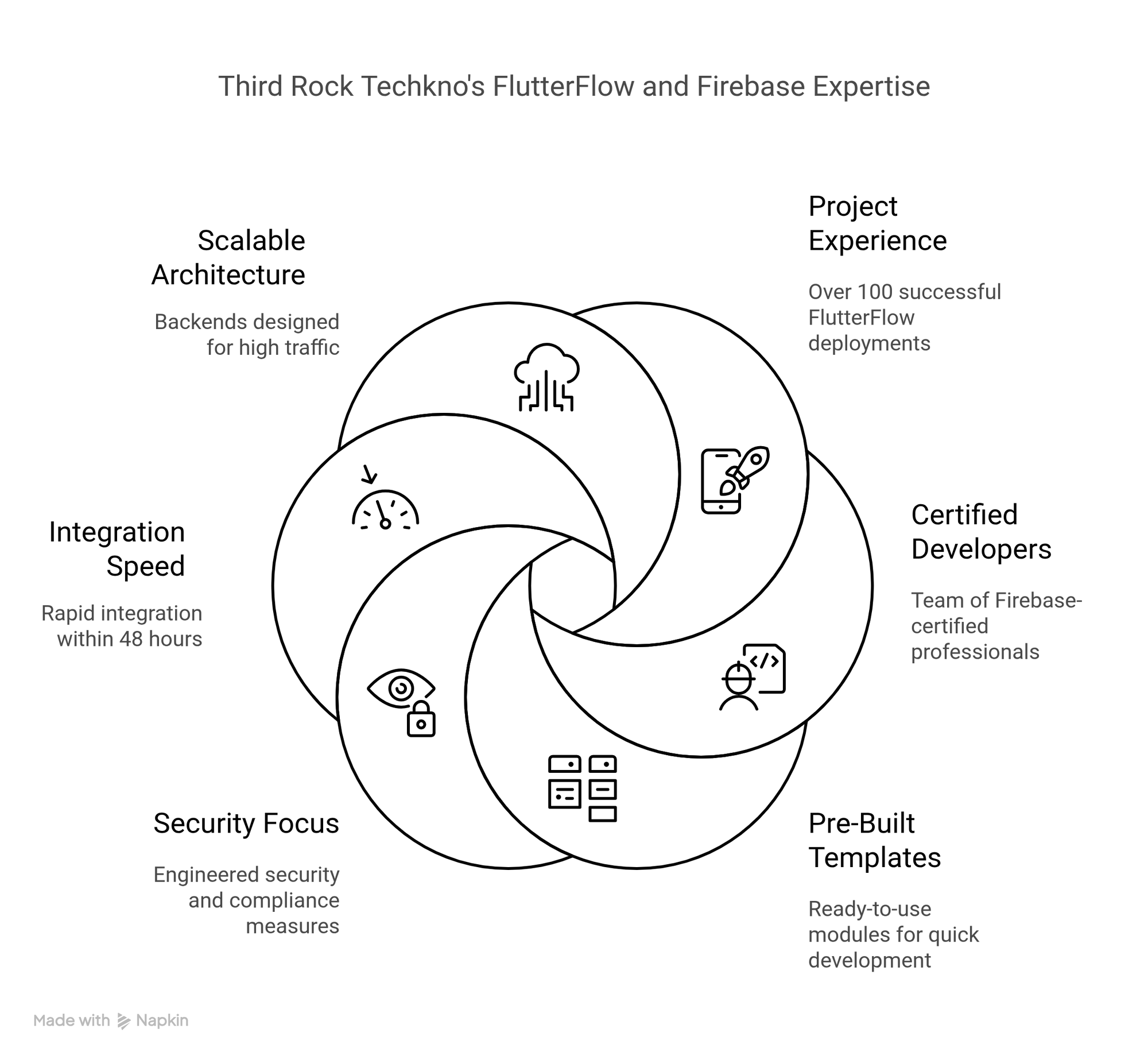
Your backend decisions can be decisive for project success while building FlutterFlow applications. Here are compelling reasons that make Third Rock Techkno the perfect partner for secure, scalable, high-performance Firebase integration.
Our FlutterFlow development expertise, combined with comprehensive Firebase integration knowledge, delivers enterprise-grade mobile applications that scale effortlessly with your business growth.
1. 100+ FlutterFlow Projects Successfully Deployed
We have successfully deployed 100+ production-ready FlutterFlow applications ranging from startup MVPs to enterprise-scale solutions. Our FlutterFlow Firebase expertise makes a significant difference in your final app deployment through:
Proven Development Advantages:
- Battle-tested workflows that eliminate costly trial-and-error in FlutterFlow development.
- Real-world optimizations that drive app performance and cost-efficiency.
- Proven architectures that deliver reliable Firebase integration results.
- Comprehensive FlutterFlow backend solutions tested across industries.
With Third Rock Techkno, you're not experimenting with your FlutterFlow application—you're building upon proven success patterns for Firebase integration that deliver measurable business results.
2. Firebase-Certified Developers for Enterprise Integration
Our talented team of Firebase-certified developers brings specialized expertise to FlutterFlow Firebase integration projects:
Expert Firebase Integration Capabilities:
- Implement best-practice security rules preventing accidental data leaks in FlutterFlow applications.
- Optimize Firestore queries for maximum speed and cost savings.
- Configure Cloud Functions for seamless backend automation.
- Design real-time database structures for optimal FlutterFlow performance.
Why trust inexperienced developers when you can work with certified Firebase integration professionals?
3. Pre-Built FlutterFlow + Firebase Templates
Accelerate FlutterFlow development using our production-ready modules designed for Firebase integration:
Ready-to-Deploy Templates:
- Complete authentication flows, including email/password, Apple, and Google integration.
- Firestore CRUD operations with built-in security rules for FlutterFlow applications.
- File upload/download systems with Firebase Storage integration.
- Real-time data synchronization templates for FlutterFlow Firebase projects.
Skip months of development work and start with production-grade FlutterFlow templates.
4. Comprehensive Security and Compliance Focus
We don't merely enable security, we engineer it into every layer of FlutterFlow Firebase integration:
Enterprise Security Implementation:
- GDPR and HIPAA-ready Firebase configurations for FlutterFlow applications.
- Penetration-tested authentication flows for maximum app security.
- Automated security audits for Firestore rules and database permissions.
- Data encryption strategies for sensitive information in mobile applications.
Sleep peacefully knowing your FlutterFlow application adheres to global compliance standards.
5. Seamless FlutterFlow Firebase Integration in 48 Hours
Compared to other FlutterFlow agencies that take weeks, we deliver comprehensive Firebase integration rapidly.
- Comprehensive Firebase Setup that includes Authentication, Firestore, and Storage.
- FlutterFlow integration with time-tested data flow patterns.
- Comprehensive documentation for your development teams.
- Real-time database configuration optimized for FlutterFlow performance.
Go from zero to a fully functional FlutterFlownback-end in merely two days!
6. Scalable Architecture for High Traffic Applications
Our FlutterFlow development team designs Firebase backend systems that effortlessly handle.
Enterprise-Scale Performance
- 50k+ concurrent users without facing any outage.
- Optimized Firestore indexes for millisecond responses.
- Reasonably-priced data models that scale predictably.
- Load balancing strategies for Cloud Functions and API Integration.
Grow your FlutterFlow application freely without backend bottlenecks limiting success.
7. Advanced Firebase Analytics and Monitoring
Our FlutterFlow Firebase expertise includes comprehensive analytics implementation.
Performance Monitoring Solutions
- Firebase Analytics integration for detailed user behaviour insights.
- Performance monitoring for FlutterFlow applications optimization.
- Crashlytics implementation for proactive app maintenance.
- Custom dashboard creation for business intelligence and app performance tracking.
Data-driven insights enable continuous FlutterFlow application improvement and optimization.
8. Ongoing Support and Maintenance
FlutterFlow Firebase applications require ongoing optimization and support:
Comprehensive Support Services:
- 24/7 monitoring for Firebase services and FlutterFlow performance.
- Regular security audits and database optimization.
- Feature updates and Firebase service integration.
- Performance tuning for growing FlutterFlow applications.
Long-term partnership ensures your FlutterFlow Firebase integration evolves with your business needs.
9. Cost Optimization and Budget Management
Our Firebase integration expertise helps optimize costs for FlutterFlow applications:
Cost Management Strategies:
- Database query optimization, reducing Firebase usage costs.
- Storage efficiency improvements for Firebase Storage.
- Cloud Functions optimization,on minimizing compute expenses.
- Analytics implementation tracking cost-effectiveness.
Maximize FlutterFlow ROI through strategic Firebase cost optimization.
Our comprehensive FlutterFlow Firebase integration expertise transforms complex backend development challenges into streamlined, scalable solutions that accelerate your mobile application success in competitive markets.
Get Expert Help with Firebase + FlutterFlow
Partner with our certified team to launch secure, scalable apps in just 48 hours.
FireBase + FlutterFlow: A Shortcut to Unassailable Apps
Developing a scalable, secure app should not mean you drown yourself in the back-end code or pass sleepless nights over server crashes. This is where the FlutterFlow Firebase integration provides the much-needed respite.
Thanks to this wonderful duo, FlutterFlow and Firebase, you are not merely developing an app; you are crafting an experience that your users can trust and love. When you combine this with Third Rock Techkno’s expertise, you get a battle-tested blueprint that will take you to the next level of success. Contact us today!
If you wish to launch swifter and sleep without a penny of doubt, opt for Firebase for FlutterFlow today!

