Introduction
Most programming in the object-oriented era has been imperative. Code tells your program what to do and has many ways to listen to change. However, you must tell the system when something changes.
Wouldn’t it be better if you could set things up so the code updates reflect changes automatically ? That's what reactive programming does. Your application reacts to the changes and underlying data without you telling to do so. This makes it easier to focus on the logic at hand rather than maintaining a particular state.
You can achieve this in swift using KVO and didSet, but it can be inconvenient to set up. Alternatively there are several frameworks in swift that facilitate reactive programming.
The RxSwift library can help you with the way to address that through asynchronous programming.
RxSwift and RxCocoa are part of the suite of Reactive Extension(Rx) language tools that span multiple programming languages and platforms.
ReactiveX(Rx) introduces a new paradigm that enables writing concise and easily readable code and facilitates powerful architecture like MVVM. It simplifies such a complex problem as handling errors across multiple threads.
RxSwift is a framework for interacting with the swift programming language, while RxCocoa is a framework that makes cocoa APIs used in iOS and OS X easier to use with reactive techniques.
Basic Components of RxSwift:
Observable Sequence
Subjects
DisposeBag
Operators
Schedules
Observable Sequence:
It is a structure which emits a certain value over time. A subscriber subscribes to the observable. We can observe an array, string, HTTP request, text change in UITextField.
You can subscribe to an observable sequence by calling
In RxSwift an event is just an Enumeration Type with three possible states.
Subjects:
A subject is a special form of an observable sequence, you can subscribe and dynamically add elements to it. There are currently four different kinds of subjects in RxSwift.
- PublishSubject
- BehaviourSubject
- ReplaySubject
- BehaviourReplay (which was Variable)
Each type gives us the functions to receive the value change of subscribers when listening or not.
DisposeBag:
Garbage pickup and removal. It helps automatically deallocate objects from memory (leveraging, ofcourse, Automatic Reference Counting mechanism — ARC).
Without a DisposeBag, you’d get one of two results. Either the Observer would create a retain cycle, hanging on to what it’s observing indefinitely, or it could be deallocated, causing a crash.
For more : https://github.com/ReactiveX/RxSwift/blob/master/RxSwift/Disposables/DisposeBag.swift
Operators:
We have a lot of powerful operators supporting us so well such as
Scheduler:
The last one is also the most important one. A RxSwift scheduler manages threads before and after the subscriber receives the return value.
We can work with schedulers like
RxSwift Code Example:
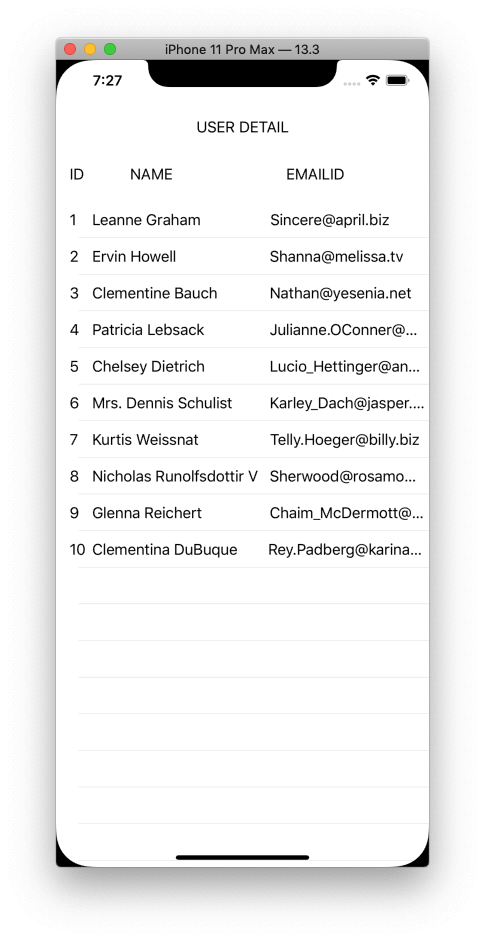
Here, starting with a very simple example in which we will display the basic details of users from api in tableview. Before getting started you need to install cocoa pods for RxSwift and RxCocoa libraries. So let’s get started.
Create a Model:
struct User: Codable {
    var id: Int
    var name: String
    var email: String
}
This model stores basic details like id, name and emailId of the user. We made this model decodable to go from a JSON data object to an actual swift class or struct.
Create a function to call API using observable :
func fetchData<T: Codable>(url: String) -> Observable<T> {
  return Observable<T>.create { observer in
    guard let request = URL(string: url) else {
        return Disposables.create()
    }

    let task = URLSession.shared.dataTask(with: request ) { (data, response, error) in
      do {
        let model = try JSONDecoder().decode(T.self, from: data ?? Data())
        observer.onNext( model )
      } catch let error {
        observer.onError(error)
      }
      observer.onCompleted()
    }

    task.resume()
    return Disposables.create {
      task.cancel()
    }
  }
}
In this function we are returning Observable of any T type (Observable<T>). Firstly, it takes data from a given url and stores it in the url variable. After that if a given url exists then we are fetching data from the any T type by decoding tham using
Our observable variable observer observes the data fetched from the given url and
If there is any error , the catch block will call and observer variable’s
If a task is completed then the observer variable’s
For more about URLSession in swift: https://github.com/ReactiveX/RxSwift/blob/master/RxCocoa/Foundation/URLSession%2BRx.swift
Create a disposeBag and an observable:
let disposeBag = DisposeBag()
var users:Observable<[User]>?
Bind the data in a tableView:
users = fetchData()
users?.bind(to: tableView.rx.items(cellIdentifier: "UserCell")) { row, dataSource, cell in
    guard let cell = cell as? UserCell else { return }
    cell.setupData(user: dataSource)
}
.disposed(by: disposeBag)
It is binding the data to the tableView directly without calling dataSource methods and reloading tableView again. At the end we are disposing using
Output: