

We believe adaptation to the latest trends in the coding. Hence, we have been using TypeScript in all our major projects. We love code the the frontend in Angular 2, React and the dynamic backend in NodeJS.
Here’s a small example we have created using TypeScript, NodeJS and ExpressJS to upload a file with BusBoy using Typescript.
Please follow the below steps.
Step 1: Clone repository with the following command.
git clonehttps://github.com/thirdrocktechkno/trt-express-nodejs-typescript-busboy-fileupload-emaple.git
Step 2: Go to project directory and run
npm installStep 3: Now execute. ( npm run grunt command is for compiling the typescript
source code, you can check out gruntfile.js have all the configuration. )
npm run gruntStep 4: Create images folder inside the dist folder
mkdir dist/imagesStep 5: Now run
npm run startStep 6: Click on this link to verify server is running properly
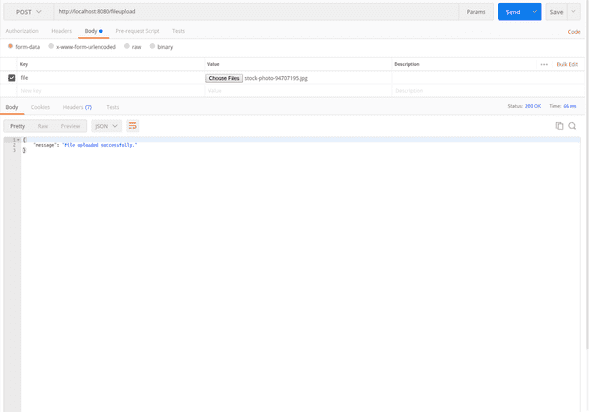
[http://localhost:8080/](http://localhost:8080/)Step 7: Here is the URL for file upload
http://localhost:8080/fileupload and pass multipart form data.
Read Also : How to set up a cron job in NodeJS?
Brief information about Typescript files.
- server.ts in src folder -> In this file we export the Server class, this class will configure our express web application, REST API and routes.
- route.ts in src/routes/ folder -> This file will export the BaseRoute class, In this class you can define script for all routes which will be required. Method render() will invoke BaseRoute’s child class.
- index.ts in src/routes/ folder -> This class extends BaseRoute class, you can define route in create() method.
- routes() method in server.ts -> In this method we have created router instance of express.Router() and call the create() method of IndexRoute and passed router as a parameter.
I hope the steps have got the example running in you local machine. We love to share at Third Rock Techkno what we learn with our community.
Happy coding !!!
Do share your feedback. :)
· · · ·Third Rock Techkno is a leading IT services company. We are a top-ranked web, voice and mobile app development company with over 10 years of experience. Client success forms the core of our value system.
We have expertise in the latest technologies including angular, react native, iOs, Android and more. Third Rock Techkno has developed smart, scalable and innovative solutions for clients across a host of industries.
Our team of dedicated developers combine their knowledge and skills to develop and deliver web and mobile apps that boost business and increase output for our clients.


