

The global LMS market hit $28.9 billion in 2025 and is projected to reach $82 billion by 2032. Over 83% of businesses worldwide now use learning management system platforms for employee training, and 99% of colleges rely on an LMS for course delivery.
But here's the problem: with over 700 LMS platforms available, choosing the right one feels overwhelming. Every vendor claims to have the "best LMS features," and the lists of capabilities can run into the hundreds.
What LMS features actually matter? Which learning management system features drive real learning outcomes versus which ones just look good in demos?
This comprehensive LMS features guide cuts through the noise. We've identified the 30 essential LMS features that consistently separate effective learning platforms from mediocre ones, organized by category, so you can prioritize based on your specific needs.
Whether you're building a custom LMS from scratch, comparing LMS features across vendors, or upgrading an existing system, this LMS features checklist covers the must-have capabilities that make the difference.
Core LMS Features for Learning Delivery
These are the foundational learning management system features every LMS needs to function effectively.
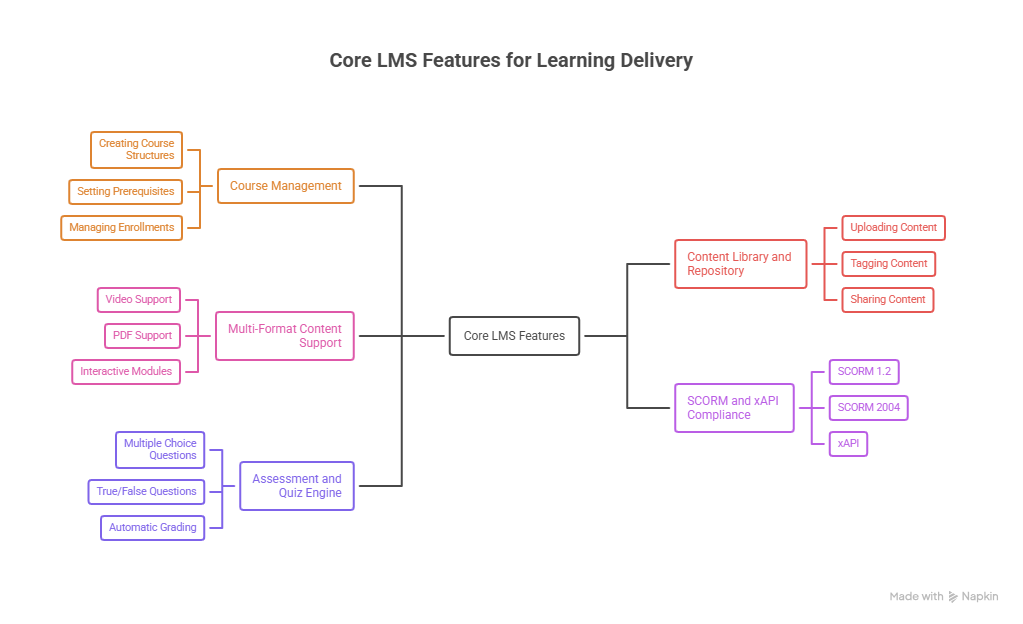
1. Course Management
At its core, an LMS needs to organize, deliver, and track learning content efficiently. This includes creating course structures, setting prerequisites, managing enrollments, and controlling access.
Why it matters: Poor course management creates friction for both administrators and learners. When content is hard to find or navigate, completion rates drop.
What to look for: Intuitive course builders, drag-and-drop organization, bulk enrollment options, and flexible access controls.
2. Content Library and Repository
A centralized location where all learning materials live videos, documents, SCORM packages, assessments, and supporting resources. The best systems make content easy to upload, organize, tag, and reuse across multiple courses.
Why it matters: Without a well-organized library, teams waste hours hunting for materials or accidentally duplicating content.
What to look for: Searchable repositories, tagging systems, version control, and the ability to share content across courses without duplication.
3. Multi-Format Content Support
Learners engage with different content types differently. An effective LMS supports video, audio, PDFs, presentations, interactive modules, SCORM packages, and embedded web content.
Why it matters: Limiting content formats restricts how you can teach. Some concepts need video demonstrations; others work better as interactive simulations.
What to look for: Native support for common formats, embedded video players, and the ability to combine formats within a single course.
4. SCORM and xAPI Compliance
SCORM (Sharable Content Object Reference Model) and xAPI (Experience API) are industry standards for creating and tracking eLearning content. SCORM ensures content works across different systems; xAPI tracks learning experiences beyond traditional courses.
Why it matters: Without standards compliance, you're locked into one vendor's ecosystem. SCORM 1.2 and SCORM 2004 are the most widely used versions—any LMS you choose should support both.
What to look for: Support for SCORM 1.2, SCORM 2004 (3rd and 4th editions), and xAPI. Some modern platforms also support CMI5, which combines SCORM packaging with xAPI tracking.
5. Assessment and Quiz Engine
Built-in tools for creating quizzes, tests, and assessments, including multiple choice, true/false, matching, fill-in-the-blank, short answer, and essay questions.
Why it matters: Assessments are how you verify learning actually happened. Manual assessment is time-consuming; automated assessment with instant feedback scales.
What to look for: Multiple question types, randomization options, time limits, attempt restrictions, and automatic grading for objective questions.
User Experience LMS Features
These LMS features determine how learners interact with the platform day-to-day.
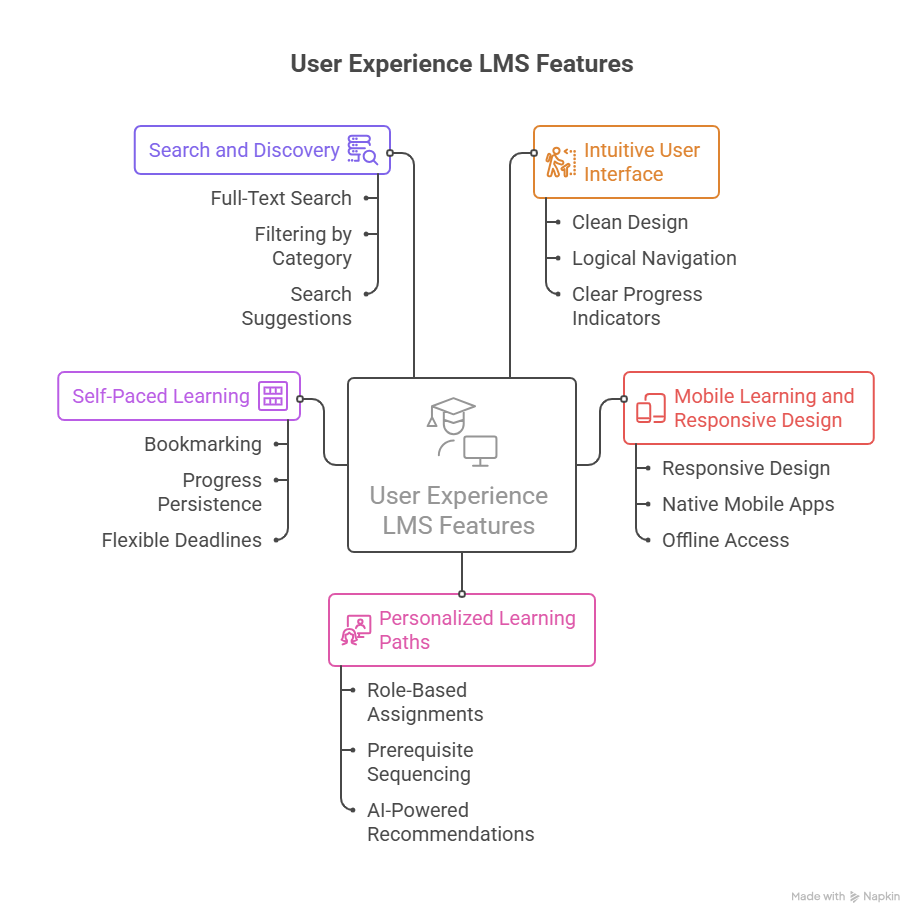
6. Intuitive User Interface
The learning platform should be easy to navigate without extensive training. If learners can't find their courses or track their progress, they won't complete training.
Why it matters: A confusing interface creates friction that kills engagement. The best LMS platforms require minimal onboarding for end users.
What to look for: Clean design, logical navigation, clear progress indicators, and consistent layout across devices.
7. Mobile Learning and Responsive Design
Learners access training on smartphones and tablets, not just desktops. The mobile learning market alone is projected to reach $287 billion by 2030.
Why it matters: If your LMS doesn't work well on mobile, you're missing learners who prefer on-the-go access, especially field workers, frontline employees, and distributed teams.
What to look for: Responsive design that adapts to screen sizes, native mobile apps (iOS and Android), offline access capabilities, and push notifications.
8. Personalized Learning Paths
Different learners need different content. Personalized learning paths guide individuals through relevant courses based on their role, skill level, or learning goals.
Why it matters: Generic one-size-fits-all training wastes time. Personalization ensures learners focus on what they actually need.
What to look for: Role-based course assignments, prerequisite sequencing, branching paths based on assessment results, and AI-powered recommendations.
9. Self-Paced Learning
Learners should be able to progress through content at their own speed, pausing and resuming as needed. This requires robust progress tracking that remembers where learners left off.
Why it matters: Forcing everyone to move at the same pace frustrates both fast and slow learners. Self-paced access respects individual schedules and learning styles.
What to look for: Bookmarking, progress persistence, flexible deadlines, and the ability to revisit completed content.
10. Search and Discovery
When your content library grows, finding specific courses or materials becomes critical. An effective search includes filters, categories, and smart suggestions.
Why it matters: If learners can't find relevant training, they won't complete it—or they'll skip straight to asking colleagues, which defeats the purpose.
What to look for: Full-text search, filtering by category/duration/format, search suggestions, and recently viewed content.
Not Sure Which LMS Features You Actually Need?
We'll help you figure out what matters for your learners, your compliance needs, and your budget.

Engagement and Gamification LMS Features
These LMS features drive completion rates and knowledge retention.
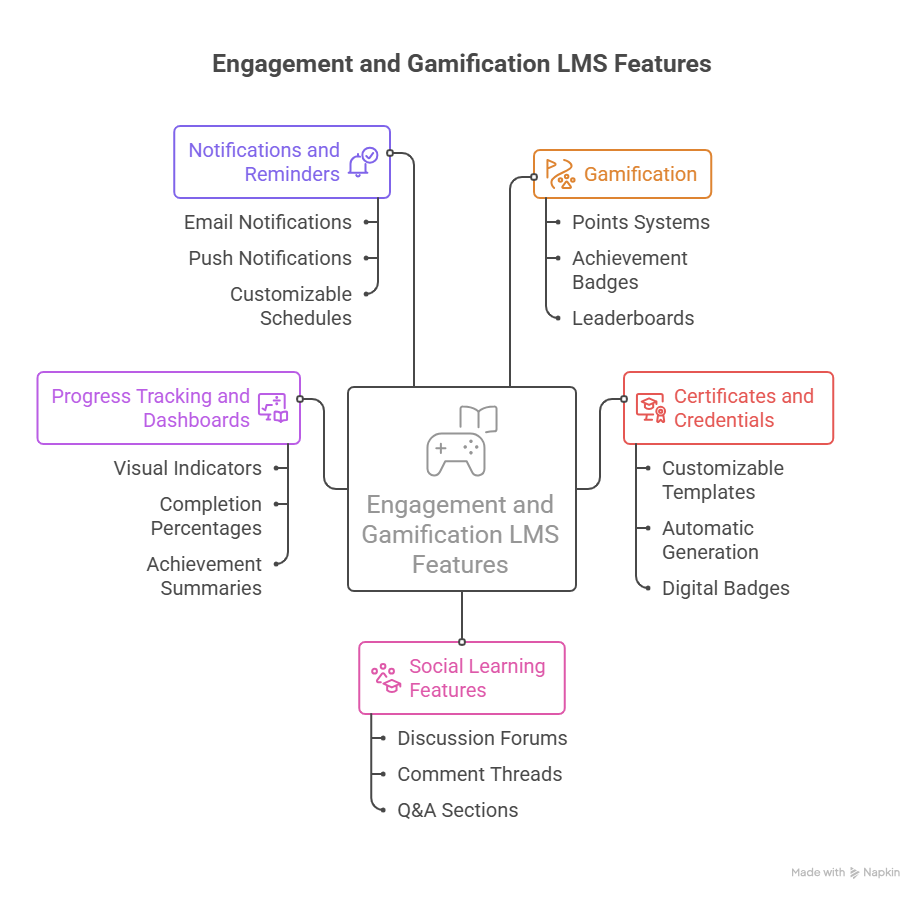
11. Gamification
Game elements like points, badges, leaderboards, and achievements make learning more engaging. Gamified learning has been shown to increase participation by 48%.
Why it matters: Training that feels like a chore gets abandoned. Training that feels like a challenge gets completed.
What to look for: Points systems, achievement badges, leaderboards, daily streaks, and the ability to customize which activities earn rewards.
12. Certificates and Credentials
Learners want recognition for completing training. Certificates provide proof of completion; digital badges (micro-credentials) can be shared on LinkedIn and other platforms.
Why it matters: Certificates motivate completion and provide documentation for compliance. Digital badges extend this value by being shareable and verifiable.
What to look for: Customizable certificate templates, automatic generation upon completion, expiration tracking for recertification, and digital badge integration.
13. Social Learning Features
Learning doesn't happen in isolation. Social features allow learners to discuss content, share insights, ask questions, and learn from peers.
Why it matters: Peer interaction reinforces learning and surfaces questions instructors might not anticipate.
What to look for: Discussion forums, comment threads on content, Q&A sections, learner profiles, and the ability to share achievements.
14. Progress Tracking and Dashboards
Learners need visibility into their own progress, what they've completed, what's outstanding, and how they compare to requirements or peers.
Why it matters: Without clear progress visibility, learners lose motivation. Dashboards create accountability and celebrate progress.
What to look for: Visual progress indicators, completion percentages, upcoming deadlines, and achievement summaries.
15. Notifications and Reminders
Automated reminders about upcoming deadlines, incomplete courses, new content, and certification expirations keep learners engaged without manual follow-up.
Why it matters: People forget. Automated nudges dramatically improve completion rates without requiring administrator intervention.
What to look for: Email notifications, push notifications (for mobile), customizable reminder schedules, and escalation rules.
Administration and Management LMS Features
These learning management system features help administrators run training programs efficiently.
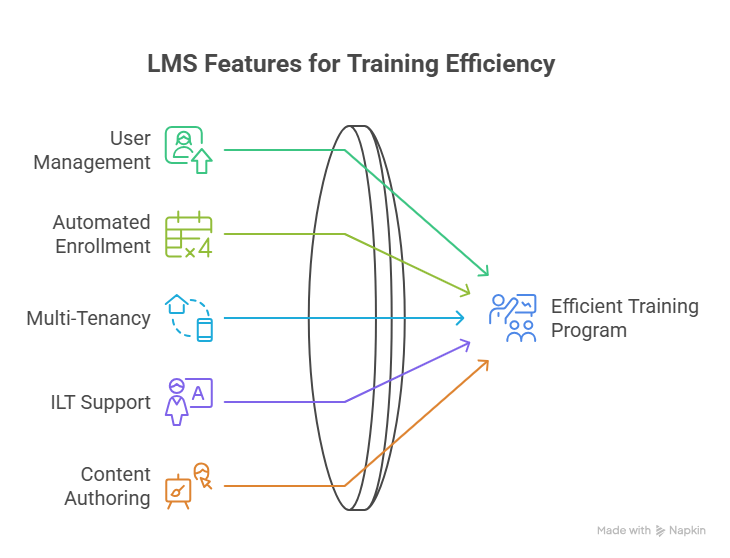
16. User Management
Tools for creating, organizing, and managing learner accounts, including bulk imports, role assignments, and organizational hierarchies.
Why it matters: As organizations scale, manual user management becomes impossible. Automation is essential.
What to look for: Bulk user import/export, role-based permissions, organizational unit structures, and self-registration options.
17. Automated Enrollment
Automatically assign courses based on rules, new hire role, department, location, or specific triggers like promotion or certification expiration.
Why it matters: Manual enrollment doesn't scale. Automated rules ensure the right people get the right training at the right time.
What to look for: Rule-based enrollment triggers, scheduled enrollments, prerequisite enforcement, and recertification automation.
18. Multi-Tenancy and Learning Portals
The ability to create separate branded portals for different audiences, departments, clients, partners, or franchises, each with its own content, users, and branding.
Why it matters: Organizations often need to deliver training to distinct groups with different needs. Multi-tenancy eliminates the need for separate systems.
What to look for: White-labeling options, independent branding per portal, separate user bases, and content sharing between portals.
19. Instructor-Led Training (ILT) Support
Not all training is self-paced. Many organizations blend online content with live sessions, whether in-person or virtual. ILT support manages scheduling, registration, attendance, and resources.
Why it matters: Blended learning consistently outperforms purely self-paced or purely instructor-led approaches.
What to look for: Session scheduling, capacity management, waitlists, attendance tracking, and integration with video conferencing tools.
20. Content Authoring Tools
Built-in tools for creating learning content without external software. The best platforms include drag-and-drop course builders, quiz creators, and video recording capabilities.
Why it matters: Relying on third-party authoring tools adds cost and complexity. Built-in tools speed development and reduce vendor dependency.
What to look for: Visual course builders, template libraries, quiz creation tools, and the ability to import/export content.
Analytics and Reporting LMS Features
These LMS features help you understand what's working and what isn't.
21. Real-Time Analytics
Live dashboards showing current enrollment, progress, completions, and engagement metrics. Real-time data enables quick intervention when problems arise.
Why it matters: If you only see data after the fact, you can't fix problems while they're happening.
What to look for: Live dashboards, configurable views, drill-down capabilities, and automatic refresh.
22. Compliance Reporting
Automated reports that document who completed what training, when, and with what results. Essential for regulated industries and audit preparation.
Why it matters: Manual compliance tracking is error-prone and time-intensive. Automated reports reduce audit stress and ensure accuracy.
What to look for: Pre-built compliance report templates, scheduled report generation, audit trails, and export options.
23. Custom Report Builder
The ability to create reports tailored to your specific questions beyond the standard templates every LMS includes.
Why it matters: Standard reports rarely answer every question. Custom reporting lets you analyze data in ways that matter to your organization.
What to look for: Drag-and-drop report builders, multiple data sources, visualization options, and the ability to save and schedule custom reports.
24. Skills Gap Analysis
Analytics that identify gaps between required competencies and current capabilities at individual, team, and organizational levels.
Why it matters: Training should target actual needs. Skills gap analysis ensures you're investing in development that matters.
What to look for: Competency frameworks, skill assessments, gap visualization, and recommendations for closing gaps.
Confused by LMS Feature Comparisons?
We've built learning platforms since 2015. Let's cut through the vendor noise and find what fits your training goals.
Integration and Technical LMS Features
These LMS features determine how well the learning management system works with your existing technology.
25. Single Sign-On (SSO)
Learners access the LMS using their existing organizational credentials; no separate login is required. Supports standards like SAML, OAuth, and OpenID Connect.
Why it matters: Extra passwords create friction and support headaches. SSO eliminates both.
What to look for: Support for your identity provider (Azure AD, Okta, Google, etc.), automatic user provisioning, and session management.
26. API and Integrations
Open APIs and pre-built integrations connect the LMS to HR systems, CRM platforms, video conferencing tools, and other business applications.
Why it matters: Isolated systems create data silos and manual workarounds. Integrations keep information flowing automatically.
What to look for: REST APIs, webhooks, pre-built connectors for common tools (Salesforce, Workday, Microsoft Teams, Zoom), and documentation quality.
27. Cloud Deployment
Most modern LMS platforms are cloud-based, eliminating the need for on-premises servers, maintenance, and upgrades. Cloud deployment enables automatic updates and scales with demand.
Why it matters: On-premises systems require IT resources and create upgrade headaches. Cloud deployment shifts this burden to the vendor.
What to look for: Uptime guarantees, data residency options, backup/recovery policies, and transparent pricing.
28. Data Security and Privacy
Encryption, access controls, and compliance with regulations like GDPR, FERPA, and SOC 2. Protecting learner data is non-negotiable.
Why it matters: Training data often includes sensitive information about employee performance and skills. Security breaches create legal and reputational risk.
What to look for: Encryption (at rest and in transit), role-based access controls, audit logging, compliance certifications, and data processing agreements.
Advanced LMS Features for 2026
These capabilities distinguish next-generation learning management system platforms.
29. AI-Powered Features
Artificial intelligence is transforming LMS capabilities from content recommendations and automated content creation to adaptive learning paths and intelligent tutoring.
Why it matters: AI removes guesswork from personalization and automates tasks that would otherwise require manual effort.
What to look for: AI-driven content recommendations, automated quiz generation, chatbot support, predictive analytics for at-risk learners, and AI-assisted content authoring.
30. Virtual and Augmented Reality Support
Immersive learning through VR and AR is growing rapidly, especially for hands-on training, safety simulations, and complex procedures.
Why it matters: Some skills can't be taught effectively through video and text alone. VR/AR provides safe, repeatable practice environments.
What to look for: VR/AR content support, integration with headsets and devices, and xAPI tracking for immersive experiences.
How to Prioritize LMS Features for Your Organization
Not every organization needs every LMS feature. Here's how to think about prioritization when comparing learning management system features:
For Small Businesses and Startups: Focus on ease of use, mobile access, and pre-built content libraries. You need to launch fast without dedicated IT support. Gamification and automation help small teams do more with less.
For Mid-Size Organizations: Add compliance reporting, automated enrollment, and integrations with existing HR systems. As you scale, manual processes break down.
For Enterprises: Prioritize multi-tenancy, advanced analytics, robust APIs, and global scalability. Large organizations need systems that handle thousands of learners across regions and business units.
For Educational Institutions: Emphasize assessment capabilities, gradebook integration, accessibility compliance, and support for synchronous learning. Academic use cases have distinct requirements from corporate training.
For Compliance-Heavy Industries: Make compliance reporting, audit trails, certification tracking, and recertification automation non-negotiable. The cost of compliance failure far exceeds the cost of the right tools.
Ready to Build a Custom LMS?
We develop EdTech platforms that fit your exact requirements. Book a call with our team.
Common LMS Features Selection Mistakes
Avoid these pitfalls when evaluating learning management system features:
Buying features you won't use. Enterprise platforms packed with capabilities you don't need add cost and complexity without value.
Ignoring user experience. A feature-rich system that learners hate won't drive adoption. Test with actual end users, not just administrators.
Underestimating integration needs. Confirm your LMS can connect to existing systems before committing. Discovering integration gaps post-purchase is expensive.
Skipping mobile testing. Responsive design claims don't always match reality. Test on actual devices before deciding.
Forgetting about content. The best LMS is useless without quality content. Factor in content development costs and tools.
Conclusion
The right LMS features depend on your specific needs, but certain learning management system features matter across almost every use case. Core delivery features, intuitive user experience, engagement tools, robust administration, meaningful analytics, and solid integrations form the foundation of any effective learning platform.
The LMS market will continue evolving AI capabilities, immersive learning, and skills-based development are accelerating. Choose a learning management system built to grow with these trends, not one locked into yesterday's approaches.
Ready to Build a Custom Learning Management System?
We've been building EdTech platforms since 2015. Whether you need a full custom LMS or specific feature development for an existing system, we can help you create a learning platform that fits your exact needs. Book a call with our team.
FAQs
What are the most important LMS features for corporate training?
For corporate training, prioritize mobile access, SCORM compliance, automated enrollment, compliance reporting, and integration with HR systems. Gamification and certification management also drive engagement and completion rates in workplace settings.
What's the difference between SCORM and xAPI?
SCORM tracks learning within the LMS course completions, quiz scores, and time spent. xAPI tracks learning experiences anywhere, including mobile apps, simulations, and real-world activities. xAPI is more flexible but requires a Learning Record Store (LRS) to function.
Do I need a cloud-based or on-premises LMS?
Cloud-based LMS platforms are the standard for most organizations they're easier to deploy, automatically updated, and scale on demand. On-premises deployment is typically only needed for organizations with strict data residency requirements or existing infrastructure investments.
How much does an LMS typically cost?
Pricing varies widely. Cloud-based platforms often charge per user per month, ranging from $2-15 per user, depending on features. Enterprise solutions may use flat licensing or usage-based models. Factor in implementation, content development, and ongoing support costs beyond the license fee.
What LMS features help with learner engagement?
Gamification (points, badges, leaderboards), social learning features, personalized learning paths, mobile access, and progress dashboards all drive engagement. The key is making learning feel relevant and rewarding rather than obligatory.
